

TRAVEL-GUIDE.APP
Expert reviews on the best travel apps
Minneapolis

Top 10 Essential Travel Apps for Exploring Minneapolis

Visiting Minneapolis is an exciting prospect, offering a blend of Midwestern hospitality, vibrant urban culture, and stunning natural beauty. However, successfully navigating the sprawling Twin Cities area requires careful planning. Whether you are aiming to traverse the expansive light rail system, find the best local eats, or simply navigate the city's unique indoor skyway network, having the right digital tools is essential. Travel apps are indispensable companions that help travelers minimize stress and maximize their time while exploring the unique character of Minneapolis.

The verdict: the most useful app for Minneapolis according to our editors is

Metro Transit Icon

Metro Transit

Official Metro Transit app for the Twin Cities • Mobile ticketing for bus, light rail, and Northstar • Integrated trip planning and departure tracking

Top App
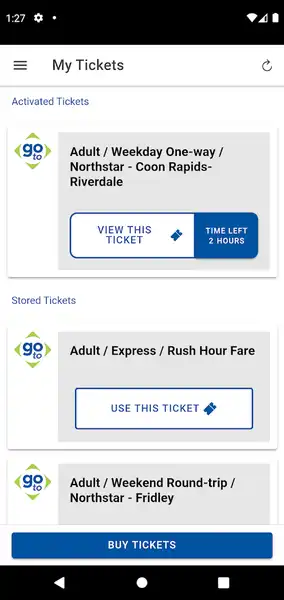
For any visitor arriving in the Twin Cities, the Metro Transit app is the foundational tool for getting around. As the official resource for the Minneapolis/St. Paul metropolitan area, it is the most reliable way to navigate the bus, light rail, and Northstar commuter train systems. The app solves the primary challenge of public transportation: ticket convenience. Instead of fumbling with paper fares at kiosks, travelers can purchase and store mobile tickets directly on their phones. Simply select your rider type, choose your service, and checkout using integrated payment methods like Apple Pay or credit cards. The app’s 'NexTrip' feature is particularly useful, offering real-time departure information so you know exactly when your next bus or train will arrive, eliminating long, uncertain waits at stations. While the app is excellent for general transit, it is also your gateway to major hubs. It simplifies the logistics of traveling between the airport and downtown, as well as reaching popular sites like the Mall of America or local cultural districts.

While some features might redirect to a browser, the core functionality of purchasing and activating tickets while on the go remains incredibly efficient. Remember to activate your ticket just before boarding to ensure you are compliant with local fare policies. By keeping your battery charged and the app handy, you effectively turn your smartphone into a pocket-sized ticket machine. This app is the best way to integrate seamlessly into the local transit network, ensuring you spend less time worrying about logistics and more time experiencing Minneapolis. Whether you are a solo traveler heading to a museum or a family planning a day of shopping, this app is the most essential tool for efficient, stress-free travel throughout the metro area.
Screenshot
Pros
  • Official transit integration
  • Convenient mobile ticketing
  • Secure payment processing
Cons
  • Requires active internet connection
  • Some features redirect to web browser
  • Occasional account registration issues
Metro Transit Icon

Get the app

Other useful apps for visiting Minneapolis

Beyond official transit, your smartphone can be a powerhouse for managing every facet of your trip. Below are nine additional essential apps to enhance your stay in the Twin Cities, covering everything from logistics and parking to dining and local exploration.
Transit - Subway & Bus Times Icon

Transit - Subway & Bus Times

Comprehensive real-time public transit tracking • Multi-modal trip planning • Digital ticket management • Offline schedule access

While official agency apps are vital, Transit - Subway & Bus Times is often preferred by seasoned travelers for its intuitive, comprehensive approach. It excels at consolidating real-time arrival data from various local transit agencies, ensuring you never miss a connection. What sets it apart is its 'GO' feature, which provides step-by-step navigation, including alerts for when it is time to depart or transfer—a lifesaver when navigating an unfamiliar city. The interface is incredibly fast and user-friendly, providing a clear map view of nearby bus stops and train stations with live tracking. Beyond buses and trains, it integrates multimodal options, showing you live locations for bike-share and scooter rentals, which is perfect for traversing Minneapolis during the warmer months. It solves the fragmentation problem by acting as a 'one-stop-shop' for your daily travel. Additionally, it features crowd-sourced data, allowing you to see how crowded a bus or train is before it arrives, which helps in planning a more comfortable journey. If you value a clean, high-performance interface that combines multiple modes of transport and provides accurate, real-time data, this is an indispensable app for your Minneapolis visit.
Key Features
  • Real-time vehicle tracking and ETAs
  • Multi-modal trip planning including bike and scooter
  • Digital fare and bikeshare payments
  • Crowdsourced rider information
  • GO navigation for turn-by-turn transit alerts

On-demand ride booking with diverse vehicle options • Real-time route and cost transparency • Integrated public transit and micro-mobility solutions

For those moments when public transit isn't the most convenient option, Lyft is an essential download for your Minneapolis arsenal. It solves the problem of navigating the city outside of fixed transit hours or routes, providing reliable, on-demand transportation. The app's strength lies in its versatility; you aren't just limited to standard cars. Depending on your needs, you can select 'Wait & Save' for more affordable trips, or choose bikes and scooters directly within the app for shorter, more adventurous hops around the city lakes or downtown area. The transparency of the app is its best feature—you see your route, estimated time of arrival, and cost up front before you confirm. This eliminates the uncertainty often associated with travel costs in a new city. Furthermore, Lyft often integrates public transit directions directly into its interface, allowing you to compare the cost and time of taking a ride versus a public transit route. It is the perfect backup or primary tool for getting to dinner, heading to the airport with luggage, or quickly reaching a destination that is slightly off the beaten path.
Key Features
  • On-demand ride booking
  • Public transit route integration
  • Multiple vehicle tiers
  • In-app bike and scooter rentals
MPLS Parking Icon

MPLS Parking

Convenient mobile parking payments • Real-time session notifications and extensions • Integrated vehicle locator and snow emergency alerts

If you are planning to rent a car during your stay, the MPLS Parking app is mandatory. Parking in a bustling urban environment can be a major source of stress, but this official app simplifies the entire process. It eliminates the need to carry change or hunt for a functioning kiosk; you can pay for parking directly from your device, and even better, extend your session remotely if your lunch or meeting runs longer than expected. The app sends helpful push notifications before your time expires, saving you from the risk of parking tickets. Another clever feature is the 'Find my car' tool, which is a lifesaver if you are unfamiliar with the downtown grid or large parking garages. Given that Minneapolis takes its winter road conditions seriously, the inclusion of 'Snow Emergency' alerts is a vital, localized feature that keeps you informed about street parking restrictions during winter storms. It is a highly practical, user-friendly tool that solves the most common headaches associated with city driving, ensuring your vehicle logistics are as smooth as possible.
Key Features
  • Mobile payments
  • Find my car location service
  • Face ID integration
  • Snow emergency alerts
  • Remote parking session extension
Skyway Map Minneapolis Icon

Skyway Map Minneapolis

Comprehensive map of downtown Minneapolis climate-controlled skyways covering 80 city blocks and 11 miles of indoor pedestrian connectivity.

Minneapolis is famous for its unique 'skyway' system—a vast network of climate-controlled pedestrian bridges that connect downtown buildings, allowing locals to walk for miles without ever setting foot outside in the winter. For a visitor, however, this network can be incredibly disorienting. The Skyway Map Minneapolis app is designed to solve this exact problem. It provides an interactive guide to the 80 city blocks and 11 miles of indoor connectivity, helping you navigate between major downtown venues, corporate offices, hotels, and retail centers. While it may lack real-time GPS tracking, it acts as an essential visual reference to understand which buildings are linked and where to find access points to the street level. It turns a confusing maze into a manageable path, particularly during the coldest months of the year. If you plan to spend any significant time downtown, having this specialized map at your fingertips will save you from getting lost and help you navigate the city efficiently, regardless of the weather conditions outside.
Key Features
  • Interactive skyway map
  • Custom marker placement
  • Downtown Minneapolis building connectivity

Discover and book 65,000+ restaurants worldwide • Manage reservations on the go • Earn dining rewards

Minneapolis has a booming culinary scene, and OpenTable is the gold standard for securing a spot at the city's most desirable restaurants. It solves the frustration of calling around to find availability or walking into a full venue. With just a few taps, you can browse local favorites, view menus, and read verified diner reviews to make informed choices. The app’s real-time reservation system is its greatest asset, allowing you to modify your booking, change your party size, or cancel with ease. It also includes helpful features like waitlist notifications for highly sought-after restaurants that may appear fully booked. Beyond just convenience, it offers a loyalty rewards program, letting you accumulate points with every reservation that can eventually be redeemed for future meals. Whether you are looking for an upscale dinner in the North Loop or a casual brunch spot near the Chain of Lakes, OpenTable provides a seamless, stress-free way to manage your dining itinerary. Its intuitive interface and massive network make it the premier tool for food-focused travelers.
Key Features
  • Real-time restaurant discovery
  • Search filters for cuisine and occasion
  • In-app reservation modification
  • Table availability alerts
  • Loyalty points and rewards tracking
Minneapolis Airport FlightInfo Icon

Minneapolis Airport FlightInfo

Comprehensive flight tracking • Indoor airport navigation maps • Real-time status updates for arrivals and departures • Taxi and terminal information

Navigating a large international airport can be daunting, but Minneapolis Airport FlightInfo makes your transit through MSP significantly smoother. This app focuses specifically on the local airport, providing essential, real-time data on arrivals and departures. It solves the problem of needing to constantly check boards by putting flight status, gate changes, and baggage claim information right on your phone. One of its standout features for a visitor is the inclusion of indoor airport maps, which help you quickly locate amenities, dining, and terminal connections without wandering aimlessly. It also provides helpful guidance on taxi and ground transportation options available immediately outside the terminal. While the interface is straightforward and features occasional ads, the utility of having airport-specific data in one place—especially when dealing with potential flight delays or navigating the layout for the first time—is undeniable. It is a specialized, functional tool that reduces the anxiety of air travel, ensuring you stay well-informed from the moment you land until you depart.
Key Features
  • Real-time flight status updates
  • Detailed departure and baggage information
  • Indoor airport mapping
  • Taxi service coordination
MyTSA Icon

MyTSA

Official TSA resource for travel preparation • Real-time checkpoint wait estimates • Airport delay monitoring • Prohibited item search tool

Preparation is the key to a smooth airport experience, and the official MyTSA app is an essential resource for any traveler flying into or out of MSP. The most useful feature is the 'Can I Bring?' search tool, which quickly clarifies what you can pack in your carry-on or checked luggage, preventing last-minute stress at the security checkpoint. For the nervous traveler, the app provides access to crowd-sourced security checkpoint wait times, giving you a better idea of how early you need to arrive at the airport on your specific day and time. It also keeps you updated on broader travel alerts, weather conditions at your destination, and provides direct access to AskTSA for live, personalized assistance. Additionally, it is a great educational tool if you want to learn about enrolling in TSA PreCheck to speed up your future travel experiences. By providing transparent, official information in one accessible place, MyTSA solves the uncertainty that often accompanies airport security, ensuring you are well-prepared before you even leave your hotel.
Key Features
  • Can I Bring? item search
  • Live AskTSA assistance
  • Airport delay and weather tracking
  • TSA PreCheck enrollment information
  • Crowd-sourced security wait times
Wanderlog - Trip Planner App Icon

Wanderlog - Trip Planner App

All-in-one travel planner for itineraries, maps, and group collaboration • Automatic reservation import • Real-time syncing across devices

If your trip to Minneapolis involves multiple stops, sightseeing, and coordination with friends, Wanderlog is the ultimate all-in-one trip planner. It solves the messy problem of having travel details scattered across emails, notes, and various websites. With Wanderlog, you can import flight and hotel confirmations automatically, ensuring all your logistical data is in one place. The app stands out with its map-based planning interface; as you add attractions, restaurants, or parks, they are pinned to an interactive map, allowing you to visualize your route and optimize your time. For group travelers, the collaboration feature is game-changing—you can share itineraries with friends, edit in real-time, and even split expenses, making it the perfect tool for group trips to the Twin Cities. You can also add notes to your stops, set budgets, and even access your plans offline if you opt for the Pro version. It is an incredibly intuitive app that transforms chaotic travel planning into an organized, map-driven itinerary, helping you maximize your exploration of Minneapolis.
Key Features
  • Drag-and-drop itinerary builder
  • Collaborative real-time planning
  • Automatic reservation importing
  • Interactive route mapping
  • Expense tracking and bill splitting
Offline Travel Guide Icon

Offline Travel Guide

Comprehensive offline travel guide for 30,000+ destinations • Reliable access without data roaming • Crowdsourced information powered by Wikimedia

For the traveler who values depth of information and reliability, Offline Travel Guide is an invaluable companion. Powered by the non-profit Wikivoyage, it provides a comprehensive, volunteer-curated guide to thousands of destinations, including detailed information on Minneapolis. The app’s primary advantage is that it is 100% functional offline. In an age where we rely heavily on data, this app ensures you have access to critical information—such as local customs, transportation tips, 'must-see' attractions, and restaurant recommendations—even when you lack a stable Wi-Fi connection or are traveling abroad without a data plan. It includes built-in maps and photos, acting as a digital encyclopedia for your trip. Because it is community-maintained, the information is often surprisingly detailed, featuring 'hidden gems' that typical tourist guides might overlook. It is completely ad-free and privacy-focused, which is a refreshing change in today's app market. While the initial download is large, the trade-off is having a wealth of knowledge available at your fingertips instantly, anywhere in the city. It is the perfect fallback tool for curious, budget-conscious, or tech-conscious travelers who want to explore Minneapolis with confidence.
Key Features
  • Comprehensive destination guides
  • Offline map and photo support
  • Local phrasebooks and travel tips
  • Curated restaurant and accommodation recommendations
App Icon
Now viewing